GoogleCloudPlatform/terraformer
terraformer
يقرأ terraformer بنية تديرها ويكتب Terraform. هذه الصفحة لا تصف أخذ بيانات اعتماد.
Terraformer




This project is no longer maintained and is deprecated.
As of March 16, 2026, this repository has been archived. It is now read-only, and no further updates, security patches, or support will be provided.
A CLI tool that generates tf/json and tfstate files based on existing infrastructure
(reverse Terraform).
- Disclaimer: This is not an official Google product
- Created by: Waze SRE

Table of Contents
- Demo GCP
- Capabilities
- Installation
- Supported Providers
- Major Cloud
- Cloud
- Infrastructure Software
- Network
- Cloudflare (broken, see #1761)
- Myrasec
- PAN-OS
- VCS
- Monitoring & System Management
- Community
- Identity
- Contributing
- Developing
- Infrastructure
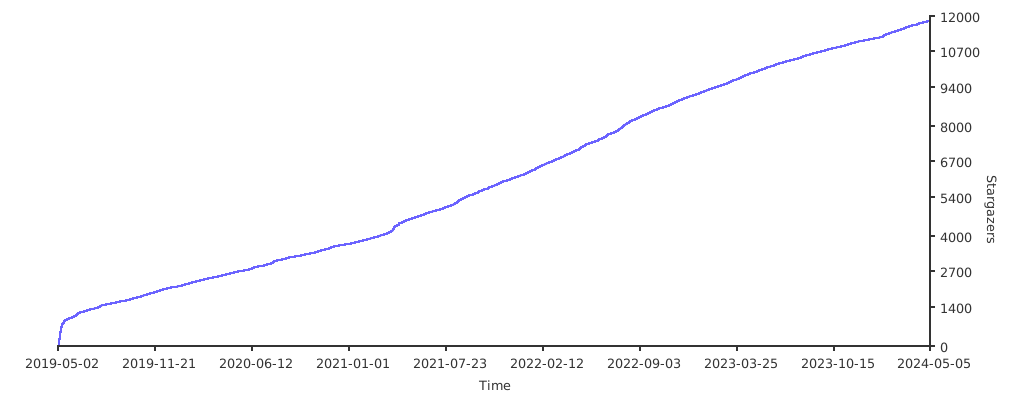
- Stargazers over time
Demo GCP

Capabilities
- Generate
tf/json+tfstatefiles from existing infrastructure for all
supported objects by resource. - Remote state can be uploaded to a GCS bucket.
- Connect between resources with
terraform_remote_state(local and bucket). - Save
tf/jsonfiles using a custom folder tree pattern. - Import by resource name and type.
- Support terraform 0.13 (for terraform 0.11 use v0.7.9).
Terraformer uses Terraform providers and is designed to easily support newly added resources.
To upgrade resources with new fields, all you need to do is upgrade the relevant Terraform providers.
Import current state to Terraform configuration from a provider

Usage:
   import [provider] [flags]
   import [provider] [command]

Available Commands:
  list        List supported resources for a provider

Flags:
  -b, --bucket string         gs://terraform-state
  -c, --connect                (default true)
  -С, --compact                (default false)
  -x, --excludes strings      firewalls,networks
  -f, --filter strings        compute_firewall=id1:id2:id4
  -h, --help                  help for google
  -O, --output string         output format hcl or json (default "hcl")
  -o, --path-output string     (default "generated")
  -p, --path-pattern string   {output}/{provider}/ (default "{output}/{provider}/{service}/")
      --projects strings
  -z, --regions strings       europe-west1, (default [global])
  -r, --resources strings     firewall,networks or * for all services
  -s, --state string          local or bucket (default "local")
  -v, --verbose               verbose mode
  -n, --retry-number          number of retries to perform if refresh fails
  -m, --retry-sleep-ms        time in ms to sleep between retries

Use " import [provider] [command] --help" for more information about a command.
Permissions
The tool requires read-only permissions to list service resources.
Resources
You can use --resources parameter to tell resources from what service you want to import.
To import resources from all services, use --resources="*" . If you want to exclude certain services, you can combine the parameter with --excludes to exclude resources from services you don't want to import e.g. --resources="*" --excludes="iam".
Filtering
Filters are a way to choose which resources terraformer imports. It's possible to filter resources by its identifiers or attributes. Multiple filtering values are separated by :. If an identifier contains this symbol, value should be wrapped in ' e.g. --filter=resource=id1:'project:dataset_id'. Identifier based filters will be executed before Terraformer will try to refresh remote state.
Use Type when you need to filter only one of several types of resources. Multiple filters can be combined when importing different resource types. An example would be importing all AWS security groups from a specific AWS VPC:
terraformer import aws -r sg,vpc --filter Type=sg;Name=vpc_id;Value=VPC_ID --filter Type=vpc;Name=id;Value=VPC_ID
Notice how the Name is different for sg than it is for vpc.
Migration state version
For terraform >= 0.13, you can use replace-provider to migrate state from previous versions.
Example usage:
terraform state replace-provider -auto-approve "registry.terraform.io/-/aws" "hashicorp/aws"
Resource ID
Filtering is based on Terraform resource ID patterns. To find valid ID patterns for your resource, check the import part of the Terraform documentation.
Example usage:
terraformer import aws --resources=vpc,subnet --filter=vpc=myvpcid --regions=eu-west-1
Will only import the vpc with id myvpcid. This form of filters can help when it's necessary to select resources by its identifiers.
Field name only
It is possible to filter by specific field name only. It can be used e.g. when you want to retrieve resources only with a specific tag key.
Example usage:
terraformer import aws --resources=s3 --filter="Name=tags.Abc" --regions=eu-west-1
Will only import the s3 resources that have tag Abc. This form of filters can help when the field values are not important from filtering perspective.
Field with dots
It is possible to filter by a field that contains a dot.
Example usage:
terraformer import aws --resources=s3 --filter="Name=tags.Abc.def" --regions=eu-west-1
Will only import the s3 resources that have tag Abc.def.
Planning
The plan command generates a planfile that contains all the resources set to be imported. By modifying the planfile before running the import command, you can rename or filter the resources you'd like to import.
The rest of subcommands and parameters are identical to the import command.
$ terraformer plan google --resources=networks,firewall --projects=my-project --regions=europe-west1-d
(snip)

Saving planfile to generated/google/my-project/terraformer/plan.json
After reviewing/customizing the planfile, begin the import by running import plan.
$ terraformer import plan generated/google/my-project/terraformer/plan.json
Resource structure
Terraformer by default separates each resource into a file, which is put into a given service directory.
The default path for resource files is {output}/{provider}/{service}/{resource}.tf and can vary for each provider.
It's possible to adjust the generated structure by:
- Using
--compactparameter to group resource files within a single service into oneresources.tffile - Adjusting the
--path-patternparameter and passing e.g.--path-pattern {output}/{provider}/to generate resources for all services in one directory
It's possible to combine --compact --path-pattern parameters together.
Installation
Both Terraformer and a Terraform provider plugin need to be installed.
Terraformer
From a package manager
- Homebrew users can use
brew install terraformer. - MacPorts users can use
sudo port install terraformer. - Chocolatey users can use
choco install terraformer.
From releases
This installs all providers, set PROVIDER to one of google, aws or kubernetes if you only need one.
- Linux
export PROVIDER=all
curl -LO "https://github.com/GoogleCloudPlatform/terraformer/releases/download/$(curl -s https://api.github.com/repos/GoogleCloudPlatform/terraformer/releases/latest | grep tag_name | cut -d '"' -f 4)/terraformer-${PROVIDER}-linux-amd64"
chmod +x terraformer-${PROVIDER}-linux-amd64
sudo mv terraformer-${PROVIDER}-linux-amd64 /usr/local/bin/terraformer
- MacOS
export PROVIDER=all
curl -LO "https://github.com/GoogleCloudPlatform/terraformer/releases/download/$(curl -s https://api.github.com/repos/GoogleCloudPlatform/terraformer/releases/latest | grep tag_name | cut -d '"' -f 4)/terraformer-${PROVIDER}-darwin-amd64"
chmod +x terraformer-${PROVIDER}-darwin-amd64
sudo mv terraformer-${PROVIDER}-darwin-amd64 /usr/local/bin/terraformer
- Windows
- Install Terraform - https://www.terraform.io/downloads
- Download exe file for required provider from here - https://github.com/GoogleCloudPlatform/terraformer/releases
- Add the exe file path to path variable
From source
- Run
git clone <terraformer repo> && cd terraformer/ - Run
go mod download - Run
go build -vfor all providers OR build with one provider
go run build/main.go {google,aws,azure,kubernetes,etc}
Terraform Providers
Create a working folder and initialize the Terraform provider plugin. This folder will be where you run Terraformer commands.
Run terraform init against a versions.tf file to install the plugins required for your platform. For example, if you need plugins for the google provider, versions.tf should contain:
terraform {
  required_providers {
    google = {
      source = "hashicorp/google"
    }
  }
  required_version = ">= 0.13"
}
Or, copy your Terraform provider's plugin(s) from the list below to folder ~/.terraform.d/plugins/, as appropriate.
Links to download Terraform provider plugins:
- Major Cloud
- Cloud
- Infrastructure Software
- Network
- VCS
- GitHub provider >=2.2.1 - here
- Monitoring & System Management
- Community
Information on provider plugins:
https://www.terraform.io/docs/configuration/providers.html
High-Level steps to add new provider
- Initialize provider details in cmd/root.go and create a provider initialization file in the terraformer/cmd folder
- Create a folder under terraformer/providers/ for your provider
- Create two files under this folder
- <provide_name>_provider.go
- <provide_name>_service.go
- Initialize all provider's supported services in <provide_name>_provider.go file
- Create script for each supported service in same folder
Contributing
If you have improvements or fixes, we would love to have your contributions.
Please read CONTRIBUTING.md for more information on the process we would like
contributors to follow.
Developing
Terraformer was built so you can easily add new providers of any kind.
Process for generating tf/json + tfstate files:
- Call GCP/AWS/other api and get list of resources.
- Iterate over resources and take only the ID (we don't need mapping fields!).
- Call to provider for readonly fields.
- Call to infrastructure and take tf + tfstate.
Infrastructure
- Call to provider using the refresh method and get all data.
- Convert refresh data to go struct.
- Generate HCL file -
tf/jsonfiles. - Generate
tfstatefiles.
All mapping of resource is made by providers and Terraform. Upgrades are needed only
for providers.
GCP compute resources
For GCP compute resources, use generated code from
providers/gcp/gcp_compute_code_generator.
To regenerate code:
go run providers/gcp/gcp_compute_code_generator/*.go
Similar projects
terraforming
Terraformer Benefits
- Simpler to add new providers and resources - already supports AWS, GCP, GitHub, Kubernetes, and Openstack. Terraforming supports only AWS.
- Better support for HCL + tfstate, including updates for Terraform 0.12.
- If a provider adds new attributes to a resource, there is no need change Terraformer code - just update the Terraform provider on your laptop.
- Automatically supports connections between resources in HCL files.
Comparison
Terraforming gets all attributes from cloud APIs and creates HCL and tfstate files with templating. Each attribute in the API needs to map to attribute in Terraform. Generated files from templating can be broken with illegal syntax. When a provider adds new attributes the terraforming code needs to be updated.
Terraformer instead uses Terraform provider files for mapping attributes, HCL library from Hashicorp, and Terraform code.
Look for S3 support in terraforming here and official S3 support
Terraforming lacks full coverage for resources - as an example you can see that 70% of S3 options are not supported:
- terraforming - https://github.com/dtan4/terraforming/blob/master/lib/terraforming/template/tf/s3.erb
- official S3 support - https://www.terraform.io/docs/providers/aws/r/s3_bucket
Stargazers over time
Use with AWS
Example:
 terraformer import aws --resources=vpc,subnet --connect=true --regions=eu-west-1 --profile=prod
 terraformer import aws --resources=vpc,subnet --filter=vpc=vpc_id1:vpc_id2:vpc_id3 --regions=eu-west-1
Profiles support
AWS configuration including environmental variables, shared credentials file (~/.aws/credentials), and shared config file (~/.aws/config) will be loaded by the tool by default. To use a specific profile, you can use the following command:
terraformer import aws --resources=vpc,subnet --regions=eu-west-1 --profile=prod
You can also provide no regions when importing resources:
terraformer import aws --resources=cloudfront --profile=prod
In that case terraformer will not know with which region resources are associated with and will not assume any region. That scenario is useful in case of global resources (e.g. CloudFront distributions or Route 53 records) and when region is passed implicitly through environmental variables or metadata service.
Examples to import other resources-
- Security Group-
terraformer import aws --resources=sg --regions=us-east-1
Supported services
accessanalyzeraws_accessanalyzer_analyzer
acmaws_acm_certificate
alb(supports ALB and NLB)aws_lbaws_lb_listeneraws_lb_listener_ruleaws_lb_listener_certificateaws_lb_target_groupaws_lb_target_group_attachment
api_gatewayaws_api_gateway_authorizeraws_api_gateway_api_keyaws_api_gateway_documentation_partaws_api_gateway_gateway_responseaws_api_gateway_integrationaws_api_gateway_integration_responseaws_api_gateway_methodaws_api_gateway_method_responseaws_api_gateway_modelaws_api_gateway_resourceaws_api_gateway_rest_apiaws_api_gateway_stageaws_api_gateway_usage_planaws_api_gateway_vpc_link
appsyncaws_appsync_graphql_api
auto_scalingaws_autoscaling_groupaws_launch_configurationaws_launch_template
batchaws_batch_compute_environmentaws_batch_job_definitionaws_batch_job_queue
budgetsaws_budgets_budget
cloud9aws_cloud9_environment_ec2
cloudformationaws_cloudformation_stackaws_cloudformation_stack_setaws_cloudformation_stack_set_instance
cloudfrontaws_cloudfront_distributionaws_cloudfront_cache_policy
cloudhsmaws_cloudhsm_v2_clusteraws_cloudhsm_v2_hsm
cloudtrailaws_cloudtrail
cloudwatchaws_cloudwatch_dashboardaws_cloudwatch_event_ruleaws_cloudwatch_event_targetaws_cloudwatch_metric_alarm
codebuildaws_codebuild_project
codecommitaws_codecommit_repository
codedeployaws_codedeploy_app
codepipelineaws_codepipelineaws_codepipeline_webhook
cognitoaws_cognito_identity_poolaws_cognito_user_pool
configaws_config_config_ruleaws_config_configuration_recorderaws_config_delivery_channel
customer_gatewayaws_customer_gateway
datapipelineaws_datapipeline_pipeline
devicefarmaws_devicefarm_project
docdbaws_docdb_clusteraws_docdb_cluster_instanceaws_docdb_cluster_parameter_groupaws_docdb_subnet_group
dynamodbaws_dynamodb_table
ebsaws_ebs_volumeaws_volume_attachment
ec2_instanceaws_instance
ecraws_ecr_lifecycle_policyaws_ecr_repositoryaws_ecr_repository_policy
ecrpublicaws_ecrpublic_repository
ecsaws_ecs_clusteraws_ecs_serviceaws_ecs_task_definition
efsaws_efs_access_pointaws_efs_file_systemaws_efs_file_system_policyaws_efs_mount_target
eipaws_eip
eksaws_eks_clusteraws_eks_node_group
elasticacheaws_elasticache_clusteraws_elasticache_parameter_groupaws_elasticache_subnet_groupaws_elasticache_replication_group
elastic_beanstalkaws_elastic_beanstalk_applicationaws_elastic_beanstalk_environment
elbaws_elb
emraws_emr_clusteraws_emr_security_configuration
eniaws_network_interface
esaws_elasticsearch_domain
firehoseaws_kinesis_firehose_delivery_stream
glueaws_glue_crawleraws_glue_catalog_databaseaws_glue_catalog_tableaws_glue_jobaws_glue_trigger
iamaws_iam_access_keyaws_iam_groupaws_iam_group_policyaws_iam_group_policy_attachmentaws_iam_instance_profileaws_iam_policyaws_iam_roleaws_iam_role_policyaws_iam_role_policy_attachmentaws_iam_useraws_iam_user_group_membershipaws_iam_user_policyaws_iam_user_policy_attachment
igwaws_internet_gateway
iotaws_iot_thingaws_iot_thing_typeaws_iot_topic_ruleaws_iot_role_alias
kinesisaws_kinesis_stream
kmsaws_kms_keyaws_kms_aliasaws_kms_grant
lambdaaws_lambda_event_source_mappingaws_lambda_functionaws_lambda_function_event_invoke_configaws_lambda_layer_versionaws_lambda_permission
logsaws_cloudwatch_log_group
media_packageaws_media_package_channel
media_storeaws_media_store_container
medialiveaws_medialive_channelaws_medialive_inputaws_medialive_input_security_group
mqaws_mq_broker
mskaws_msk_cluster
naclaws_network_acl
nataws_nat_gateway
opsworksaws_opsworks_applicationaws_opsworks_custom_layeraws_opsworks_instanceaws_opsworks_java_app_layeraws_opsworks_php_app_layeraws_opsworks_rds_db_instanceaws_opsworks_stackaws_opsworks_static_web_layeraws_opsworks_user_profile
organizationaws_organizations_accountaws_organizations_organizationaws_organizations_organizational_unitaws_organizations_policyaws_organizations_policy_attachment
qldbaws_qldb_ledger
rdsaws_db_instanceaws_db_proxyaws_db_clusteraws_db_cluster_snapshotaws_db_parameter_groupaws_db_snapshotaws_db_subnet_groupaws_db_option_groupaws_db_event_subscriptionaws_rds_global_cluster
redshiftaws_redshift_clusteraws_redshift_event_subscriptionaws_redshift_parameter_groupaws_redshift_snapshot_scheduleaws_redshift_snapshot_schedule_associationaws_redshift_subnet_group
resourcegroupsaws_resourcegroups_group
route53aws_route53_zoneaws_route53_recordaws_route53_health_check
route_tableaws_route_tableaws_main_route_table_associationaws_route_table_association
s3aws_s3_bucket
secretsmanageraws_secretsmanager_secret
securityhubaws_securityhub_accountaws_securityhub_memberaws_securityhub_standards_subscription
servicecatalogaws_servicecatalog_portfolio
sesaws_ses_configuration_setaws_ses_domain_identityaws_ses_email_identityaws_ses_receipt_ruleaws_ses_receipt_rule_setaws_ses_template
sfnaws_sfn_activityaws_sfn_state_machine
sgaws_security_groupaws_security_group_rule(if a rule cannot be inlined)
snsaws_sns_topicaws_sns_topic_subscription
sqsaws_sqs_queue
ssmaws_ssm_parameter
subnetaws_subnet
swfaws_swf_domain
transit_gatewayaws_ec2_transit_gateway_route_tableaws_ec2_transit_gateway_vpc_attachment
vpcaws_vpc
vpc_endpointaws_vpc_endpoint
vpc_peeringaws_vpc_peering_connection
vpn_connectionaws_vpn_connection
vpn_gatewayaws_vpn_gateway
wafaws_waf_byte_match_setaws_waf_geo_match_setaws_waf_ipsetaws_waf_rate_based_ruleaws_waf_regex_match_setaws_waf_regex_pattern_setaws_waf_ruleaws_waf_rule_groupaws_waf_size_constraint_setaws_waf_sql_injection_match_setaws_waf_web_aclaws_waf_xss_match_set
waf_regionalaws_wafregional_byte_match_setaws_wafregional_geo_match_setaws_wafregional_ipsetaws_wafregional_rate_based_ruleaws_wafregional_regex_match_setaws_wafregional_regex_pattern_setaws_wafregional_ruleaws_wafregional_rule_groupaws_wafregional_size_constraint_setaws_wafregional_sql_injection_match_setaws_wafregional_web_aclaws_wafregional_xss_match_set
wafv2_cloudfrontaws_wafv2_ip_setaws_wafv2_regex_pattern_setaws_wafv2_rule_groupaws_wafv2_web_aclaws_wafv2_web_acl_logging_configuration
wafv2_regionalaws_wafv2_ip_setaws_wafv2_regex_pattern_setaws_wafv2_rule_groupaws_wafv2_web_aclaws_wafv2_web_acl_associationaws_wafv2_web_acl_logging_configuration
workspacesaws_workspaces_directoryaws_workspaces_ip_groupaws_workspaces_workspace
xrayaws_xray_sampling_rule
Global services
AWS services that are global will be imported without specified region even if several regions will be passed. It is to ensure only one representation of an AWS resource is imported.
List of global AWS services:
budgetscloudfrontecrpubliciamorganizationroute53waf
Attribute filters
Attribute filters allow filtering across different resource types by its attributes.
terraformer import aws --resources=ec2_instance,ebs --filter="Name=tags.costCenter;Value=20000:'20001:1'" --regions=eu-west-1
Will only import AWS EC2 instances along with EBS volumes annotated with tag costCenter with values 20000 or 20001:1. Attribute filters are by default applicable to all resource types although it's possible to specify to what resource type a given filter should be applicable to by providing Type=<type> parameter. For example:
terraformer import aws --resources=ec2_instance,ebs --filter=Type=ec2_instance;Name=tags.costCenter;Value=20000:'20001:1' --regions=eu-west-1
Will work as same as example above with a change the filter will be applicable only to ec2_instance resources.
Few more examples - How to import ec2 instance based on instance name and id
terraformer import aws --resources=ec2_instance --filter="Name=tags.Name;Value=Terraformer" --regions=us-east-1
This command imports ec2 instance having name as Terraformer.
terraformer import aws --resources=ec2_instance --filter="Name=id;Value=i-0xxxxxxxxx" --regions=us-east-1
This command imports ec2 instance having instance-id as i-0xxxxxxxxx.
Due to fact API Gateway generates a lot of resources, it's possible to issue a filtering query to retrieve resources related to a given REST API by tags. To fetch resources related to a REST API resource with a tag STAGE and value dev, add parameter --filter="Type=api_gateway_rest_api;Name=tags.STAGE;Value=dev".
SQS queues retrieval
Terraformer uses AWS ListQueues API call to fetch available queues. The API is able to return only up to 1000 queues and an additional name prefix should be passed to filter the list results. It's possible to pass QueueNamePrefix parameter by environmental variable SQS_PREFIX.
Security groups and rules
Terraformer by default will try to keep rules in security groups as long as no circular dependencies are detected. This approach is implemented to keep the rules as tidy as possible but there can be cases when this behaviour is not desirable (see GoogleCloudPlatform/terraformer#493). To make Terraformer split rules from security groups, add SPLIT_SG_RULES environmental variable with any value.
اقرأ الأصل · README · AWS notes
https://github.com/GoogleCloudPlatform/terraformer · المكتبة